Testing the Drain Valve
Ensure the drain valve is undamaged and working within specification by doing the following:
-
Press and hold the menu button until *MAIN* appears on the display.
-
Press the number one product button to enter the filter menu.
-
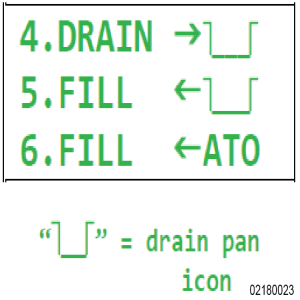
Press the right arrow until 4. DRAIN -> displays.
-
Select 4. DRAIN ->.
-
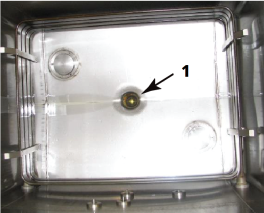
Once all the oil drains into the drain pan, visually inspect the drain and valve (1).
-
Ensure the drain valve is fully open and not partially closed, which indicates the valve assembly may be misaligned or needs replaced.
-
Select 5. FILL <-.
-
Ensure the drain valve is fully closed and not partially closed, which indicates the valve assembly may be misaligned or needs to be replaced.
-
Allow oil to fully fill the vat.
-
Once filled, cancel the filter pump motor and exit out of the filter menu by pressing and holding the menu button.
-
Continue to the next inspection or reinstall components as applicable.
If oil leaks into the filter pan, replace drain valve. Refer to Replacing the Drain Valve.
If valve is not moving but you can hear the actuator moving, remove actuator and check for actuator couple movement. Check if drain valve is seized. Actuator and valve may need to be replaced.






