Controls and Indicators
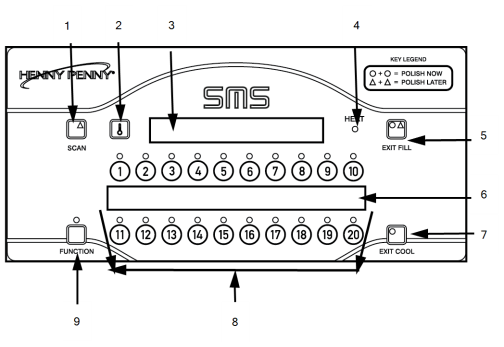
|
Item No. |
Description |
Function |
|---|---|---|
|
1 |
SCAN button |
Allows the operator to toggle through any running multiple timers. |
| 2 | Temperature Button | Allows the operator to read the temperature of the oil while in a Cook Cycle. |
|
3 |
Digital Display |
Shows all the functions of the Cook Cycle, Program Modes, Diagnostic Modes, and alarms |
| 4 | HEAT indicator | Illuminates whenever the control calls for heat; when oil temperature is reached, the heat light goes off. |
|
5 |
EXIT FILL button |
After filtering the fryer, if in the Filter Lockout Mode, the display reads “FILL” and the EXIT FILL button must be pressed. |
|
6 |
Menu Strip |
Shows the name of the product associated with each product button. |
|
7 |
EXIT COOL button |
After cooking or filtering the fryer automatically goes into cool mode (this keeps oil at a lower temperature to preserve oil life). The EXIT COOL button must be pressed to heat the oil to setpoint temperature. |
|
8 |
Product Select buttons |
Are used to select the product for cooking; to use them to start Cook Cycles. |
| 9 | FUNCTION button | Used in the programming of the controls |
Display Messages
There are messages shown on the digital display during operation. Some of the most common messages are described in the table below:
| Message | Description |
|---|---|
| HI | The display reads “HI” if the oil temperature is 40° F above the setpoint |
| DROP | The display reads “DROP” when the oil has reached the setpoint temperature (will read “DROP” 2° before setpoint and 4° above setpoint). |
| DONE | The display reads “DONE” at the end of the Cook Cycle. |






