Daily Filter
The Daily Filter is similar to the Express Filter but includes additional cleaning steps to provide a more thorough vat cleaning. It differs in the following ways:
-
Includes steps to scrub and rinse the vat.
-
Provides the option to repeat the wash cycle as needed.
-
Delivers a more thorough cleaning of the vat.
-
Must be performed once each day to remove buildup and debris from the sides and bottom of the vat.
The Daily Filter is typically performed at the end of the day after frying operations have been completed. However, it may be performed during any period when the fryer is not in use. The steps of the Daily Filter are explained below:
-
Put on Personal Protective Equipment (PPE).
-
Ensure filter pan and pan cover are properly in place with the filter pipe tightly connected.
-
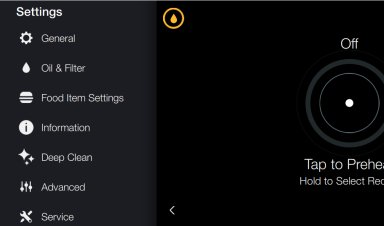
Tap the Settings button, and then tap to enter the Oil & Filter menu.
-
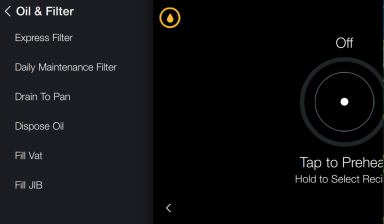
Tap Daily Filter. For split vats, choose left or right side.
-
Skim the vat.
-
Once skimming is complete, tap Start Filter. Draining displays.
Oil drains to the filter pan. After oil drains, the prompt Scrub Vat displays.
-
Remove basket support.
-
Scrub the sides and bottom of the vat with the L-tipped brush and the gong brush.
-
Tap the Start Wash button to continue. Washing - Oil pumps to wash the crumbs and debris down the drain.
-
When the wash completes Wash Complete displays. Tap one of the following:
-
Repeat Wash if additional cleaning is necessary.
-
Start Rinse to continue.
-
-
Once completed, Rinse Complete displays. Tap one of the following:
-
Repeat Rinse to rinse again.
-
Start Polish to continue.
Note: The L-tipped brush and the gong brush may be used to loosen crumbs and debris during the rinse step.
-
-
Polishing - The polish cycle is a 5 minute extended wash cycle. During this time, oil is pumped into the vat while the drain valve remains open. This extended filtration remove small particles and contaminates as the oil continuously cycles through the filter. After 5 minutes, the Refill step automatically begins.
-
Refilling displays and the drain valve closes. Please wait while oil fills the vat.
-
Once vat is full, Refill Complete displays. Tap one of the following:
-
Start Heat to continue to the next step.
-
Skip Heat to keep the vat off.
-
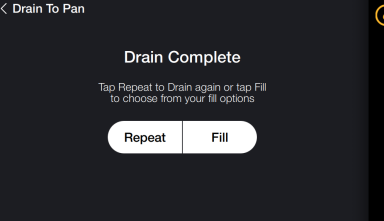
Drain Complete displays once scrubbing is complete.
Rinsing - The drain valve closes and oil fills and drains from the vat to rinse. The drain opens again to drain the oil.
Heating - The temperature of the oil is heated back to set point temperature. The cooking screen is displayed.
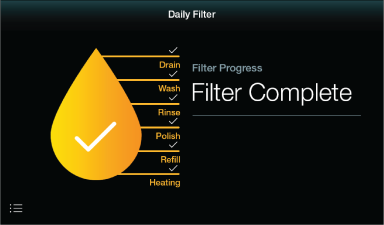
Note: When the filter is complete there will be a checkmark next to each stage showing it has been completed.