Replacing the Air Pressure Switches
Should the control panel become inoperative, or the menu card needs changed, follow these instructions:

|
To avoid electrical shock or property damage, move the power switch to OFF and disconnect power. |
-
Remove electrical power supplied to the unit.
-
Remove the lower back shroud.
-
Remove the pressure switch mounting cover from the frame.
-
Remove the vacuum hose from switch.
-
Using a cross bit or screwdriver, remove the two screws securing switch to the cover.
-
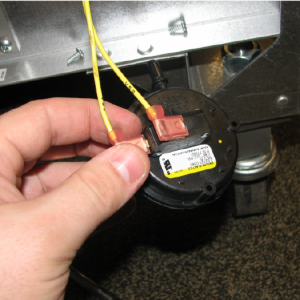
Disconnect the wires on the switch.
-
Replace switch in reverse order.
Related Content
Replacing the High Temperature Limit Control
Replacing the Temperature Probe
Replacing the Main Power Switch
Troubleshooting the Solid State High Limit
Troubleshooting EEG 25X E-4 Control Overheating Error Code
Troubleshooting EEG 25X E-5 Oil Overheating Error Code
Troubleshooting EEG 25X E-6 Temperature Probe Failure Error Code
Troubleshooting EEG 25X E-10 High Limit Error Code
Troubleshooting the EEG 25X E-18 Level Probe Failure Error Code
Troubleshooting EEG 25X E-20A Fan Sensor Stuck On Error Code
Troubleshooting EEG 25X E-20B No Draft Check Fan Error Code
Troubleshooting EEG 25X E-20D Ignition Failure Error Code
Troubleshooting EEG 25X E-22 No Heat Error Code
Reference






