Troubleshooting a Blank Display
 First Time Fix Parts
Power Supply Board

|
This appliance contains no user serviceable parts - servicing shall be carried out only by authorized personnel. For spare parts and service contact the manufacturer or authorized local agent for this product. To avoid electrical shock or property damage, disconnect power before installing or servicing equipment. |
Overview
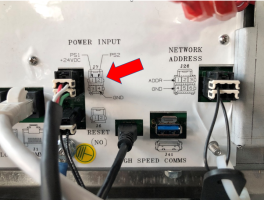
The Visual Display Module (VDM) is powered by 24 VDC. If there is a problem with the 24 VDC power than a blank screen will result. This 24 VDC comes into the VDM on the J7 connector pins 1 & 2 are (24 VDC +) and pins 3 & 4 are ground.
Call Avoidance
Perform these steps first to avoid having to go to the restaurant and adding value for your customer. These are steps we recommend every service company provide prior to going out and what makes Henny Penny the partner top food service chains can’t live without as these will save our customers money if successful. These steps can be provided over the phone, over WhatsApp, FaceTime, etc. with the restaurant manager. Example steps below:
-
Ensure all power cords are plugged in and store breakers are tuned on.
-
If there is still no display, have the caller check the bottom 2 white circuit breaker buttons behind the inside of the left hand door. Press these 2 white buttons in and release to see if the display then comes on. If still no display then service will be needed.
Field Troubleshooting
-
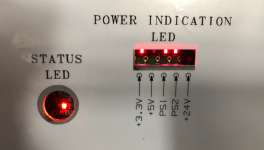
Drop the control panel down (VDM) and see if the LED power lights are on.
-
If not, check for 24 VDC between PS2 (pin2) and GND (pin4) on the J7 connector. If LED’s are on, then likely a bad control.
-
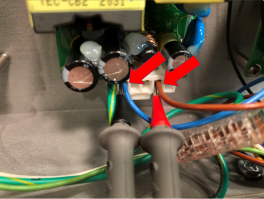
If voltage isn't present at the control, remove side panel and check all 4 power supply boards for 24 VDC output on pins 2 and 5 of the 6 pin bottom connector.
-
If no voltage is found on one of the power supply boards, replace it.
-
If 24 VDC is present, check all connection points at power supply boards power distribution board, circuit breakers and VDM.
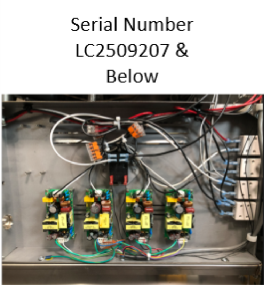
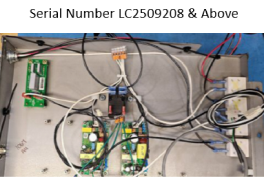
NOTE: Serial numbers LC2509207 and below will have 4 power supply boards, serial numbers LC2509208 and above will only have 2 power supply boards.
Other Possibilities
Ensure there's no DC voltage component taking away voltage from the VDM. This could be something like a drain actuator, pump motor relay, selector valve, etc. Do this by unplugging each components, and determining If voltage returns. Replace the suspect parasitic component.
If the error persists contact Technical Support for further assistance at +1-800-417-8405
Related Content
Unlocking Frozen Control Screen
Troubleshooting the E-40 (A-D) Incorrect Software Version Error Code
Troubleshooting the E-46 (A/B) - USB Import/Export Write Failure Error Code
Troubleshooting the E-48 GMU/VIU Communication Loss (Critical) Error Code
Troubleshooting an E-60 (VIU/GMU/OMS) - Communication Loss Error Code
Troubleshooting the E-93T Transformer 24 VAC Failure/Not Connected Error Code
Reference