Applies to:

Unlocking Frozen Control Screen
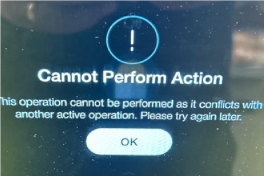
In some cases, the control screen may become locked or unresponsive when the system mistakenly detects an action is still in progress. This prevents the user from exiting the current screen or accessing other functions. Use the steps below to unlock the control screen and resume normal operation.
-
On another vat, access the Filter menu.
-
Select Fill Vat.
-
Select Fill Vat from Pan.
-
Press the Fill button for a few seconds.
-
Release the button and exit.
-
Repeat this process for all vats and the control will unlock.
-
Resume normal operation.
Related Content
Troubleshooting a Blank Display
Troubleshooting the E-40 (A-D) Incorrect Software Version Error Code
Troubleshooting the E-46 (A/B) - USB Import/Export Write Failure Error Code
Troubleshooting the E-48 GMU/VIU Communication Loss (Critical) Error Code
Troubleshooting an E-60 (VIU/GMU/OMS) - Communication Loss Error Code
Troubleshooting the E-93T Transformer 24 VAC Failure/Not Connected Error Code
Reference