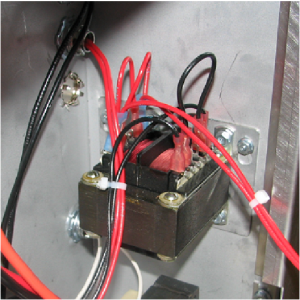
Replacing the AIF Multi-Tab Transformer

|
To avoid electrical shock or property damage, move the power switch to OFF and disconnect power. |
-
Lower the control board.
-
Mark the location of the wires, and then disconnect.
-
Use a 3/8 inch nut-driver to remove the nuts that secure the transformer to the shroud.
-
Lift up on the transformer and remove it from the studs.
-
Place the new transformer on to the studs, and then use a 3/8 inch nut-driver to secure in place.
-
Reconnect the wires.
-
Install the control board.
Related Content
Replacing the Control Transformer
Troubleshooting the Zigbee Radio
Menu Card Removal Replacement Instructions
Save and Load Setpoint Instructions
OXE 100 Troubleshooting the E-41 Programming Settings Lost Error Code
Reference
Product Racking Recommendations






