Setting Up Bulk Oil Disposal
There are four options for Bulk Oil Disposal:
-
Front - bulk disposes oil from the fryer's front bulk oil connection.
-
Rear - bulk disposes oil from the fryer's rear bulk oil connection.
-
Rear RTI - bulk disposes oil from the fryer's rear RTI connection.
-
Cart - bulk disposes oil using the Oil Disposal Shuttle (ODS).
Note: The ODS may be referred to by different names.
Before performing an oil disposal, complete the following steps to select the disposal method.
Accessing Oil Disposal Method
-
Access Settings menu.
-
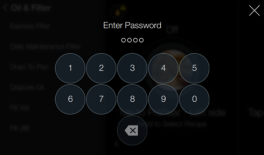
Tap Advanced. The Enter Password screen displays.
-
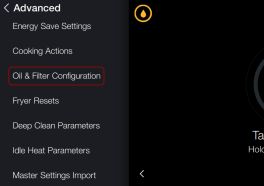
Tap 1122 to enter password. The Advanced menu displays.
-
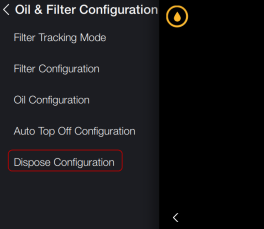
Scroll down the menu options and tap Oil & Filter Configuration.
-
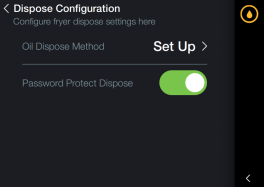
Tap Dispose Configuration.
-
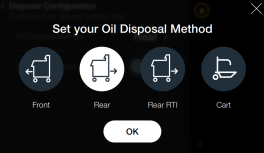
Tap Set Up. The Set your Oil Disposal Method screen displays.

Setting Up Oil Disposal Method
-
Tap an icon to select the oil disposal method. Select from the following:
-
Front - to bulk dispose oil from the fryer's front bulk oil connection.
-
Rear - to bulk dispose oil from the fryer's rear bulk oil connection.
-
Rear RTI - to bulk dispose oil from the fryer's rear RTI connection.
-
Cart - to bulk dispose oil using the Oil Disposal Shuttle (ODS).
-
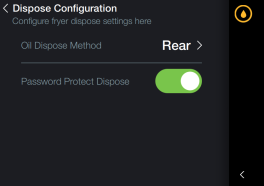
Tap OK. The Dispose Configuration screen displays.
Setting Password Protection
-
Tap the Password Protect Dispose slider button to enable password protection of the oil disposal process. The button slides right and highlights green. The 1-1-2-2 password is automatically prompted when disposing oil.
-
To disable password, tap Password Protect Dispose slider button. The slider moves left and highlights gray.
Related Content
Discarding Oil Using Front Dispose
Discarding Oil Using Rear Dispose
Discarding Oil Using Rear RTI Dispose
Discarding Oil Using Cart Dispose
Cleaning the Filter Pan Assembly
Replacing the Filter Pan Lid Gasket
Tighten Heat Probe and Element Spreader Bars
Managing Over the Air Connectivity Software Updates
Reference
OFE 51X Software without Connectivity






