Troubleshooting a Leaking Drain Valve
Is oil draining quickly from the filter pan and JIB? To identify a slow-leaking drain valve on a multi-vat unit, follow the steps below.
IMPORTANT: First, verify that any oil in the drain pan is not due to the operator failing to pump it out during Auto Filter. This issue is often caused by oil or a clogged filter pan. Once this is ruled out, proceed with the troubleshooting steps.
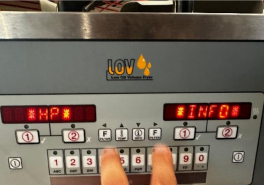
Press both FILTER buttons at the same time to access *INFO* mode.
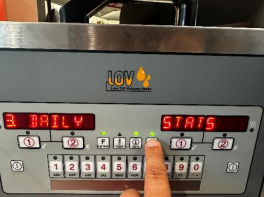
Press the PROGRAM button to scroll to 3. DAILY STATS.
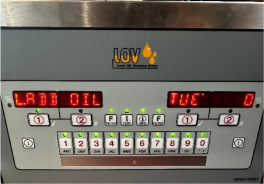
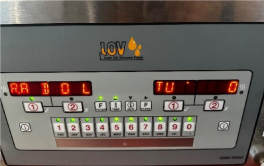
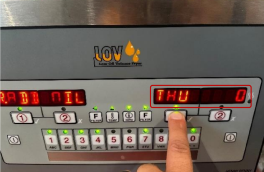
Press the FILTER button with DOWN arrow to select L: ADD OIL (left split vat) or R: ADD OIL (right split vat). The number displayed is the number of times this vat has attempted to top off the oil.
Press the right 1 ✓ (checkmark) button to step through the days of the week. This will display a week's worth of data.
Monday Tuesday Wednesday Thursday Friday Saturday Sunday Vat 1 Vat 2 Vat 3 Vat 4 Vat 5 Vat 6 Vat 7 Vat 8 Build a chart with the data, as shown.
Using the data recorded on the chart, notice the following:
If one vat has a consistently higher count than the others, that vat has the leak.
If there is one day where all the vats have a consistently higher number than all the other days, then on that day the JIB was not filled and the unit attempted to fill and failed all day.
 |  |
NOTE: To ensure accurate data, all vats must be used evenly throughout the day. Failure to use one or more vats may result in unreliable data.
Related Content
Replacing the Filter Motor Relay
Replacing the Filter Pan Switch
Replacing the Filter and JIB Lights
Repairing the Filter Pump and Motor Assembly
Replacing the Oil Level Probes
Adjusting the Drain Valve Actuator
Troubleshooting an E-82 Error Code
LVE 20X Troubleshooting the Oil Not Pumping Error Code
Reference






