Replacing the Temperature Probe
-
Drain oil from the vat:

To avoid electrical shock or property damage, move the power switch to OFF and disconnect power.
-
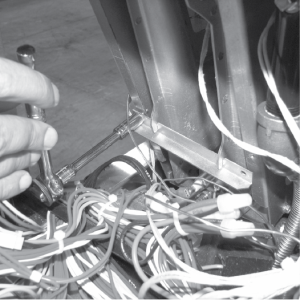
Using a 3/8 inch socket, remove two screws securing the burner jet bracket and remove bracket.
-
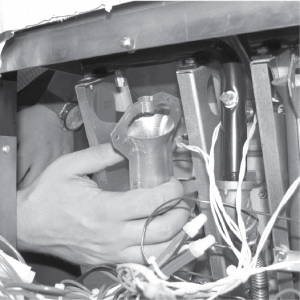
Pull both burner jets from unit.
-
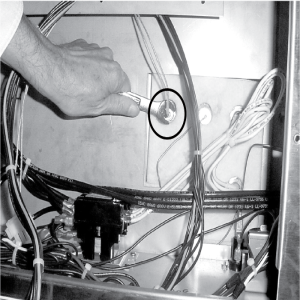
Using a 1/2 inch wrench, remove nut on compression fitting, and remove the temperature probe from the vat.
-
Using terminal extractor, remove probe terminals from connector and remove probe from unit.
-
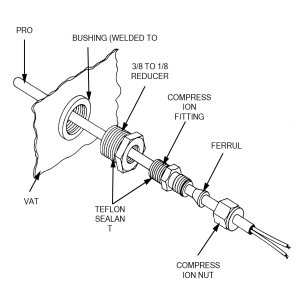
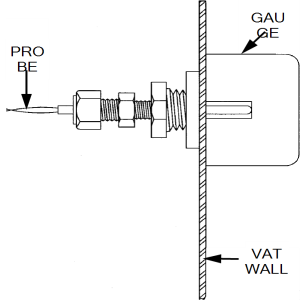
Place nut and new ferrule on the new temperature probe and insert temperature probe into the compression fitting.
-
Place gauge against vat wall as shown.
-
Push temperature probe through until it makes contact with gauge.
-
Tighten temperature probe in place.
-
Connect new temperature probe to connector and fasten connector onto control panel.
-
Replace control panel and reconnect power to vat.
-
Fill vat by
-
Press and hold a Filter button until *FILTER* *MENU* displays.
-
Then once “1.AUTO FILTER” displays, press four times until “5.FILL POT FROM DRN PAN” displays.
-
Press √ button; “FILL POT FROM DRN PAN” “YES NO” displays.
-
Press √ button again, display shows “FILLING” “STOP?” and oil fills vat.
-
Press √ button again, display shows “FILL POT FROM DRN PAN” “YES NO”. When vat is full, press X twice to return to normal operation.
-

|
Excess force will damage the temperature probe. |
Related Content
Replacing the High Limit Thermocouple
Replacing the High Limit Control
Replacing the Gas Valve Solenoid Coil
Troubleshooting the Solid State High Limit
LVG 20X Troubleshooting the E-5 Oil Overheating Error Code
LVG 20X Troubleshooting the E-6 Temperature Probe Fail Error Code
LVG 20X Troubleshooting the E-10 High Limit Error Code
LVG 20X Troubleshooting the E-20A Fan Sensor Stuck On Error Code
LVG 20X Troubleshooting the E-20B No Draft Check Fan Error Code
LVG 20X Troubleshooting the E-20D Ignition Failure Error Code
LVG 20X Troubleshooting the E-22 No Heat Error Code
Reference