Troubleshooting the Gateway
Overview
Use these steps to determine if you have a connection to the cloud (Internet).
Call Avoidance
Guide operators through these steps to determine possible issues and corrections.
Gateway Overview
Gateway Hardware
IMPORTANT: Henny Penny doesn't sell or support a cellular gateway but recommends the model ICG-150 cellular gateway.
The dongle signal strength requirement is 0 to -80 dBm. If the signal is weak it will slow communication. If the dongle cannot connect to the restaurant's network, at the required signal strength, then a cellular gateway router will need to be installed.
Any gateway connectivity device can be used to enhance or boost the signal on the Wi-Fi network or to direct connect the fryer to the Internet. The information below is provided as reference material. For detailed gateway information refer to the model ICG-150 cellular gateway.
What's in the Box
-
1 × ICG‑150 unit
-
2 × 4G LTE antennas
-
1 × Wi‑Fi antenna
-
1 × 12 V⎓1 A power supply
-
1 × 5 ft Ethernet cable
-
1 × Mounting bracket kit
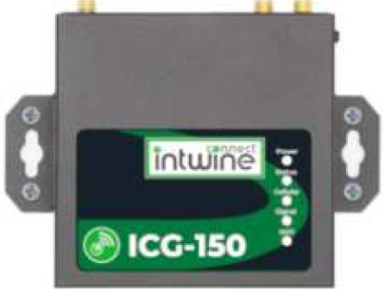
Front View
- Top/Front View: LEDS for:
Power
Fault
SIM failure
Cellular signal (levels 0–30 color-coded red/yellow/green)
Wi-Fi Status (Steady or Blinking)
Back View
-
Rear view ports:
-
Dual SIM card slots
-
Primary and diversity cellular antenna connectors
-
Wi‑Fi antenna connector
-
WAN/LAN Ethernet ports
-
Power input and reset button
-
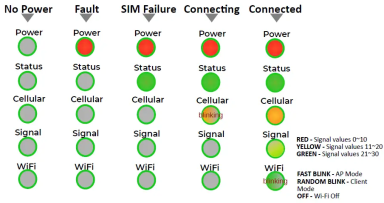
LED Indicator Guide
The LED indicators on the top panel of the ICG-150 are used to visually communicate the status of the router. The below chart can be used to determine it’s state and cellular connection.
Wall Hanging Installation
-
Fix the hanging ear to both sides of the device with the provided screws.
-
Fix the hanging ear to the wall with screws selected based on the wal type (not provided)
-
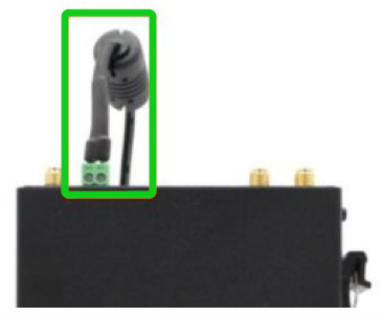
Remove power terminal from router.
-
Unscrew the locking screw on the power terminal.
-
Insert the power cable into the terminal and lock the screws.
Related Content
How to Enable Network Connectivity
Troubleshooting the Access Point Connection
Troubleshooting the Cloud Connection
Troubleshooting the User License Agreement (ULA)
Troubleshooting the IP Address
Troubleshooting the Radio (Dongle)
Troubleshooting Radio Software Setup
Troubleshooting Signal Strength
Managing Over the Air Connectivity Software Updates
Updating Connectivity Software
Reference
OFE 51X Software (without Connectivity)






