Troubleshooting the IP Address
Overview
Use these steps to determine if the control is displaying on the network.
Call Avoidance
Guide operators through these steps to determine possible issues and corrections.
Verifying IP Address
-
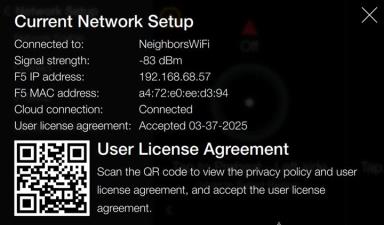
Verify the settings by navigating to: Menu > Advanced > Network Setup > Network Information.
-
Review the Current Network Setup:
-
F5 IP address: [e.g., 192.168.68.57] IP address assigned to the control (appliance) during production displays.
-
-
If the address isn't displaying, do the following:
-
Verify store's internet is active.
-
Verify fryer is connected to the correct internet connection. NOTE: Cannot be connected to a guest network.
Related Content
How to Enable Network Connectivity
Troubleshooting the Access Point Connection
Troubleshooting the Cloud Connection
Troubleshooting the User License Agreement (ULA)
Troubleshooting the Radio (Dongle)
Troubleshooting Radio Software Setup
Troubleshooting Signal Strength
Managing Over the Air Connectivity Software Updates
Updating Connectivity Software
Reference
OFE 51X Software (without Connectivity)






