OFE 51X Software without Connectivity
Note: Both software and procedure applies to both General Market F5 and McDonald's LOV3.
NOTICE | Only install this software on units with no connectivity hardware (units that DO NOT have a Wi-Fi enabled dongle). This includes:
Installing an incompatible software version will permanently disable the control. No corrective action is available and replacing the control is required. |
How to visually determine if the fryer has connectivity hardware:
 HENNYLINK® Label Figure 1 | Look for the HENNYLINK® label, shown in figure 1, located below the power switch on the left side of the fryer. The presence of this label indicates that the fryer is equipped with connectivity hardware. |
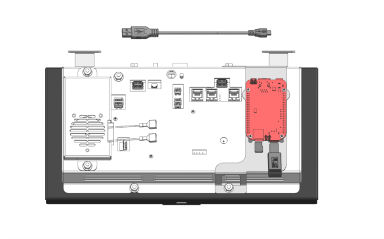 Wi-Fi Enabled Dongle Figure 2 |
Fryers manufactured after LC2602026 include connectivity hardware. Lower the far-left control of the fryer to verify if connectivity hardware is present. Connected units include the hardware identified in red in figure 2. If the fryer has connectivity hardware, DO NOT install this software version on your fryer. |
Note: Connectivity field test fryers that are in the field are not compatible with this software version. These fryers that have serial numbers will have a LC2602025 and before but run on version 2.X.X. Please reach out to Henny Penny technical support if you need further assistance with replacing or updating a control on these fryers.
IMPORTANT: Do not perform this software update on F5 and LOV3 fryers which DO include connectivity. Please visit Software with Connectivity to find software updates for fryers that DO include connectivity. For assistance with which software to install, please reach out to Henny Penny technical support.
Please refer to the Software Guidance Bulletin and Memo for more information. If you need more guidance on which software to install, reach out to Henny Penny technical support.
Please visit Update Software for instructions on how to install the software.
Download this software only on a computer. Mobile device downloads may corrupt the file.
| Version | Issues Fixed | Date Released | Click to Download |
|---|---|---|---|
| 1.6.7 | For both F5 OFE 51X General Market and McDonald’s LVE 300 fryers, updates have been released on Software v1.6.7 to fix some issues reported in the field. Fixes include: Bug Fix: Heat Recovery Logging | 05/22/2026 | Download |
| 1.6.6 | For both F5 OFE 51X General Market and McDonald’s LVE 300 fryers, updates have been released on Software v1.6.6 to fix some issues reported in the field. Fixes include:
New Features
| 04/08/2026 | N/A |
| 1.6.4 | For both F5 OFE 51X General Market and McDonald’s LVE 300 fryers, updates have been released on Software v1.6.4 to fix some issues reported in the field. Fixes include:
| 12/12/2025 | N/A |
Related Content
Installing the OFE 51X Open Fryer
Operating the OFE 51X Open Fryer
Training on the OFE 51X Open Fryer
Programming the OFE 51X Open Fryer
Troubleshooting the OFE 51X Open Fryer
Information on the OFE 51X Open Fryer
How to Enable Network Connectivity
Discarding Oil Using Front Dispose
Discarding Oil Using Rear Dispose
Discarding Oil Using Rear RTI Dispose
Discarding Oil Using Cart Dispose
Cleaning the Filter Pan Assembly
Replacing the Filter Pan Lid Gasket
Tighten Heat Probe and Element Spreader Bars
Managing Over the Air Connectivity Software Updates
Changing from a Dedicated Display to a Multi-Product Display
Updating Connectivity Software
ATO System Sequence of Operation
ATO System Theory of Operation
Bulk Oil System Theory of Operation
Cart Dispose System Sequence of Operation
Cart Dispose System Theory of Operation
Electric Heat Sequence of Operation
Electric Heat Theory of Operation
Filtering Sequence of Operation
Power Distribution Board (PCB) Theory of Operation
Power Modulation Unit (PMU) High Limit Theory of Operation
Bulk Oil System Sequence of Operation
Troubleshooting the Access Point Connection
Troubleshooting the Cloud Connection
Troubleshooting the User License Agreement (ULA)
Troubleshooting the IP Address
Troubleshooting the Radio (Dongle)
Troubleshooting Radio Software Setup
Troubleshooting Signal Strength
Troubleshooting a Blank Display
Troubleshooting an E-5 Error Oil Too Hot
Troubleshooting an E-6 (A-B) Temperature Probe Failed Error Code
Troubleshooting an E-10 High Limit Error
Troubleshooting an E-21 Error Recovery Fault
Troubleshooting an E-22 Error No Heat
Troubleshooting an E-31 Error Elements Up
Troubleshooting the Check JIB Message
Selector Valve Port Configurations
Replacing the Selector Valve Motor
Replacing the Port Selector Valve Assembly
Troubleshooting a Drain Pan Switch Failure
Troubleshooting a Change Pad Reminder XX hrs. Error
Troubleshooting an E-82D Selector Valve Error
CE Filter Motor Cover Retrofit
Bulk Dispose and Fill Retrofit
Retrofitting Adjustable Filter Pan Guide Rail
Reference






