Applies to:

LVE 300 Software with Connectivity
NOTE: Both software and procedure applies to both General Market F5 and McDonald's LOV3.
|
NOTICE |
Only install this software on units built with connectivity hardware (units that DO have a Wi-Fi enabled dongle). This includes:
Installing an incompatible software version will permanently disable the control. No corrective action is available and replacing the control will be required. |
How to visually determine if the fryer has connectivity hardware:

HENNYLINK® Label Figure 1 |
Look for the HENNYLINK® label, shown in figure 1, located below the power switch on the left side of the fryer. The presence of this label indicates that the fryer is equipped with connectivity hardware. |
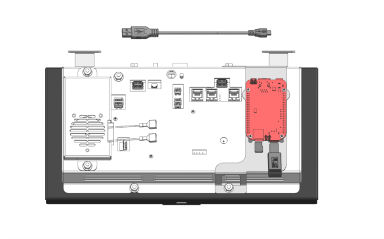
Wi-Fi Enabled Dongle Figure 2 |
Fryers manufactured after LC2602026 include connectivity hardware. Lower the far-left control of the fryer to verify if connectivity hardware is present. Connected units include the hardware identified in red in figure 2. If the fryer has connectivity hardware, DO NOT install this software version on your fryer. |
NOTE: Connectivity field test fryers that are in the field are not compatible with this software version. These fryers have serial numbers prior to LC2602026 but run on version 2.X.X. Please reach out to Henny Penny technical support if you need further assistance with replacing or updating a control on these fryers.
IMPORTANT: Do not perform this software update on F5 and LOV3 fryers which DO NOT include connectivity. Please visit Software: Non-Connectivity to find software updates for fryers that DO NOT include connectivity.
Please refer to the Software Guidance Bulletin and Memo for more information. If you need more guidance on which software to install, reach out to Henny Penny technical support.
Please visit Update Software for instructions on how to install the software.
Download this software only on a computer. Mobile device downloads may corrupt the file.
| Version | Issues Fixed | Date Released | Click to Download |
|---|---|---|---|
| 2.6.0 |
Software Update Release (RED Compliance Including South America) 2.6.0 started production on fryers starting with Serial Number: LC2608025 Software Versions Included with 2.6.0 package: • OMS: Version 1.2.0 • PMU: Version 1.1.0
Important Update Information! Fryers currently running Map UI Version 2.1.93 require this software package to be installed twice. This is required due to a security requirement that changes the update folder structure. This download file contains both updates: 1. First installation: Updates the fryer from Version 2.1.93 to Version 2.1.98 2. Second installation: Updates the fryer from Version 2.1.98 (or later) to Version 2.6.0
Installation Requirements Current Fryer Version Number of Installations Required 2.1.93 - Install the software package twice 2.1.98 or later - Install the software package once
Verify the Current Software Version Before updating, check the fryer's current software version on the touch screen: Settings → Information → About This Fryer → More Information
Reminder If the fryer is running Version 2.1.93, complete the normal software update procedure two times using the same software package to ensure the fryer is fully updated to Version 2.6.0. |
08/05/2026 | Download |
| 2.1.98 | Released RED compliance certification enabling global connectivity outside of South Africa. | 04/10/2026 | N/A |
Related Content
Installing the LVE 300 Open Fryer
Operating the LVE 300 Open Fryer
Training on the LVE 300 Open Fryer
Programming the LVE 300 Open Fryer
Troubleshooting the LVE 300 Open Fryer
Information about the LVE 300 Open Fryer
How to Enable Network Connectivity
Discarding Oil Using Front Dispose
Discarding Oil Using Rear Dispose
Discarding Oil Using Rear RTI Dispose
Discarding Oil Using Cart Dispose
Cleaning the Filter Pan Assembly
Replacing the Filter Pan Lid Gasket
Tighten Heat Probe and Element Spreader Bars
ATO System Sequence of Operation
ATO System Theory of Operation
Bulk Oil System Sequence of Operation
Bulk Oil System Theory of Operation
Cart Dispose System Sequence of Operation
Cart Dispose System Theory of Operation
Control MAP Sequence of Operation
Control MAP Theory of Operation
Electric Heat Sequence of Operation
Electric Heat Theory of Operation
Filtering Sequence of Operation
PMU Hi Limit Theory of Operation
Changing from a Dedicated Display to a Multi-Product Display
Troubleshooting the Internet Connection
Troubleshooting the Cloud Connection
Troubleshooting the User License Agreement (ULA)
Troubleshooting the IP Address
Troubleshooting the Radio (Dongle)
Troubleshooting Radio Software Setup
Troubleshooting Signal Strength
Troubleshooting a Blank Display
Unlocking Frozen Control Screen
Troubleshooting an E-10 High Limit Error
Troubleshooting an E-5 Error Oil Too Hot
Troubleshooting an E-6 (A-B) Temperature Probe Failed Error Code
Troubleshooting an E-21 Error Recovery Fault
Troubleshooting an E-22 Error No Heat
Troubleshooting an E-31 Error Elements Up
Troubleshooting the Check JIB Message
Selector Valve Port Configurations
Replacing the Selector Valve Motor
Troubleshooting a Change Pad Reminder XX hrs. Error
Troubleshooting a Drain Pan Switch Failure
Troubleshooting an E-82D Selector Valve Error
CE Filter Motor Cover Retrofit
Retrofitting Adjustable Filter Pan Guide Rail
Reference